drawText() - Media Method
The drawText() method composites the specified text string onto the image. This function fully supports CMYK image operations.
The foreground color can vary with this function, depending on the original Media object. If the object has a set foreground color, or it is set with the setColor() function, MediaRich uses the set color. However, if the object has no set foreground color, MediaRich does the following:
» For objects with 256 colors or less, MediaRich uses the last color index.
» For objects with 15-bit or greater resolution (including the CMYK colorspace), MediaRich uses white.
Note: Using drawText() within a JavaScript for loop can result in initially poor anti-aliasing. To maintain optimal anti-aliasing, place the text object outside the loop.
Syntax
drawText(
[Font @ <"font family", "virtualfilesystem:/font family">]
[Style @ <"modifier">]
[Text @ <"string">]
[Color @ <color in hexadecimal, rgb, or cmyk>]
[Index @ <value 0..16777215>]
[Unlock @ <color in hexadecimal, rgb, or cmyk>]
[Saturation @ <value 0..255>]
[Size @ <value>]
[Justify @ <"left", "center", "right", "justified">]
[Wrap @ <pixel-width>]
[Opacity @ <value 0..255>]
[X @ <pixel>]
[Y @ <pixel>]
[HandleX @ <"left", "center", "right">]
[HandleY @ <"top", "middle", "bottom">]
[Angle @ <angle>]
[Smooth @ <true, false>]
[SmoothFactor <0 .. 4>]
[BaseLine @ <true, false>]
[spacing @ <+ or ->]
[Kern @ <true, false>]
[Line @ <value 0.1 to 10>]
[Blend @ <"blend-type">]
[Tile @ <true, false>]
[Append @ <true, false>]
[ClearType @ <true, false>] //(windows only)
[Dpi @ <0.0...10000.0>]
);
Parameters
Font - specifies the TrueType or PostScript font family name to be used, for example, Arial. MediaRich supports Type 1 (.pfa and .pfb) PostScript fonts only.
Note: The size of the font in pixels is dependent on the resolution of the resulting image. If the resolution of the image is not set (zero), the function uses a default value of 72 DPI.
The default location for fonts specified in a MediaScript is the fonts file system, which includes both the MediaRich Shared/Originals/Fonts folder and the default system fonts folder. If a MediaScript specifies an unavailable font, MediaRich generates an error.
Note: You can modify the MediaRich server local.properties file to change the default fonts directory.
MediaRich also allows you to set up virtual file systems and then use the Font parameter to specify fonts from that file system. Virtual file systems are defined in the MediaRich server’s local.properties file.
For example, if you define “CorpFonts:” to represent the path “C:/Fonts/CorpFonts/” in the local.properties file, you can use files from the CorpFonts directory with the drawText() function similar to the following:
image.drawText(Font @ "CorpFonts:/Arial", Text @ "Automated Imaging Solutions", Size @ 18, Color @ 0x0000FF, x @ 185, y @ 30, Smooth @ true, Kern @ true);
Style - specifies the font style. You can use any combination of modifiers. Each modifier should be separated by a space character.
Note: The Style parameter is not available if MediaRich is running on Mac or Linux.
Weight modifiers modify the weight (thickness) of the font. The valid weight values, in order of increasing thickness, are the following:
» thin
» extralight or ultralight
» light
» normal or regular
» medium
» semibold or demibold (semi or demi are also acceptable)
» bold
» extrabold or ultrabold (extra or ultra are also acceptable)
» heavy or black
Other Style parameter values are Underline, Italic or Italics, and Strikethru or Strikeout).
Note: You can combine Style parameter values. For example: Style @ “Bold Italic”
Text - specifies the text to be drawn. The text string must be enclosed in quotes. To indicate a line break, insert \n into the text.
Color - specifies the color to be used for the text. The default value for text color is the image’s foreground color. For more information about setting an image’s foreground color, see setColor() - Media Method.
This parameter supports a hexidecimal, RGB, or CMYK color specification:
» hexidecimal - color value expressed as a value from 0x000000 to 0xFFFFFF (RGB colorspace) or from 0x00000000 to 0xFFFFFFFF (CMYK colorspace)
» RGB - color value expressed as a value from 0 to 16,777,215
» CMYK - color value expressed as a value from 0 to 4,294,967,295
Colorspace
Always pass a color value appropriate to the colorspace. You can ensure this using the getPixelFormat() function in your script and then using different hexadecimal values for the RGB and the CMYK colorspaces in an IF/THEN construction. If getPixelFormat() returns "CMYK," use the CMYK value (0x plus eight more digits), and otherwise use the RGB value (0x plus six more digits).
If a color palette is available for coloring the text, you can use the Index parameter to colorize the text (as an alternative to the Color parameter).
Important: You cannot specify values for both the Color and Index parameters.
Unlock - specifies a color value that determines which pixels are displayed in the overlaid source image. Using this parameter causes the selected foreground (source) image to display only where the specified color value appears in the current (background) image.
Saturation - specifies the value used for the weighting for the change in saturation for destination pixels. A value of 255 changes the saturation of pixels to the specified color. A value of 128 changes the saturation of a pixel to a mid-value between the pixel’s current color and the specified color.
Note: The Saturation parameter only functions when the Blend parameter is set to colorize.
Size - sets the point size of the font to be used. The default size is 12.
Justify - specifies how the text will be justified. The default is center. Other options are left, right, and justified. (The justified option is available for Windows only.) This parameter only affects text with multiple lines.
Wrap - specifies a value used to force a new line whenever the text gets longer than the specified number of pixels (in this case correct word breaking is used).
Opacity - specifies opacity of the text. The default value is 255 (completely solid).
X and Y - specify the text’s position on the image, based on text’s anchor point. The default value is the center point of the image.
Handlex and Handley - specify the anchor point of the text (for example, Handlex = left/center/right, Handley= top/middle/bottom) relative to the placement point of the image (as specified by the X and Y parameters described above). The default values are center and middle.
Angle - allows the text to be rotated clockwise by the specified angle (in degrees).
Line - specifies line spacing. The default spacing between lines of text is 1.5.
Smooth - specifies that the text is drawn with five-level anti-aliasing.
SmoothFactor - specifies the power of two for image scale-based smoothing. If 1 is specified, the text will be drawn at twice the specified size and scaled down. If 2 is specified, the text is drawn at four times the size. This scaling produces smoother text for renderers with poor anti-aliasing at smaller text sizes. The Smooth parameter must be set to true for this parameter to have any effect.
Baseline - if specified, the text is treated as though it is always the height of the largest character. This allows text to be aligned between different calls to the function. The distance, in pixels, between the baselines of two lines of text is 1.5 times the point-size of the text. Thus for 30-point text the line spacing is 45 pixels. If this parameter is not specified, this function measures the actual height of the text and centers it accordingly.
Spacing - adjusts the spacing between the text characters. The default is 0. A negative value draws the text characters closer together.
Kern - if set to true, which is the default, it optimizes the spacing between text characters. If you do not want to use kerning, specify this parameter as false.
Note: PostScript fonts store the kerning information in a separate file with an .afm extension. This file must be present in order for kerning to be applied to the text.
Blend - specifies the type of blending used to combine the drawn object with the images. Blend options are: Normal, Darken, Lighten, Hue, Saturation, Color, Luminosity, Multiply, Screen, Dissolve, Overlay, HardLight, SoftLight, Difference, Exclusion, Dodge, ColorBurn, Under, Colorize (causes only the hue component of the source to be stamped down on the image), and Prenormal.
Tile - if set to true, the text wraps continuously along both the x- and y-axis so that it spans the entire target image. The tiling starts in the location specified by the X and Y and HandleX and HandleY parameters. If not specified, tiling starts from the target image’s center.
Note: If the source image is larger than the target image, setting the Tile parameter to true has no effect, unless the source image is sufficiently offset from the center to allow this effect to display.
Append - if set to true, drawText() appends the text of the previous call to the specified text string.
Note: Append works best when drawing a single line of left-justified text, as subsequent calls to drawText() will not maintain the wrap or justification information.
ClearType - if specified as true, the Windows ClearType text renderer will be used if available.
DPI - specifies the DPI used for text rendering. The default value is 72.
Note: The DPI parameter is not available if MediaRich is running on Mac or Linux.
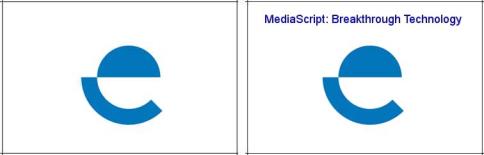
Example
var image = new Media();
image.load(name @ "logobg.tga");
image.drawText(Font @ "Arial", Style @ "Bold", Text @ "MediaScript: Breakthrough Technology", Size @ 18, Color @ 0x0000FF, x @ 185, y @ 30, Smooth @ true, Kern @ true);
image.save(type @ "jpeg");
On-Line Documentation