Viewing and Modifying the Local Properties
You can view and set the local properties for the current server in the Local Properties dialog. These properties include setting local paths (for example, fonts), file server paths (for example, to the image cache and original files), and various other settings such as the number of Web server and MediaRich Server threads that can run simultaneously.
To work with the local properties:
| 1. | Choose Properties > Local Properties. |
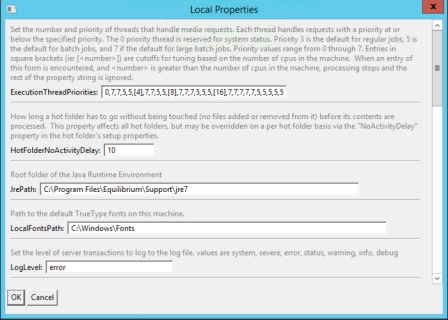
Defining the local properties
| 2. | Confirm or modify the following settings: |
Note: When a path is not specified for one OS, Equilibrium\ means C:\Program Files\Equilibrium on Windows, /Library/Equilibrium on the Macintosh, and /usr/lib/Equilibrium on Linux.
• ExecutionThreadPriorities: Specifies the number and priorities of execution threads that will be generated to handle requests.
This setting will determine how many jobs the server processes simultaneously.
• HotFolderNoActivityDelay: Determines how long a Hot Folder has to go unmodified (nothing added to it or removed from it) before its contents are processed.
• LocalFontsPath: Sets the path to the fonts folder.
For Windows servers, the default path is C:\WINDOWS\Fonts.
For Mac OS X servers, the default paths are /Library/Fonts and /System/Library/Fonts.
• LogLevel: Sets the level of server transactions to log. Available values are system, severe, error, status, warning, info, and debug.
During normal production use, this value should be set to “error”. This will keep the size of the log files to a minimum, while still reporting on critical events that an administrator should be aware of.
The “info” and “debug” levels are used for troubleshooting issues with particular MediaRich scripts or with the MediaRich system as a whole. If you are experiencing a problem, you should set the Log Level to “debug”, restart MediaRich, cause the problem to occur again, and then check the latest information added to the log files.
• LogRolloverFrequency: Sets the frequency of rollover for log files.
• MediaPath: Sets the path to original media.
The default path is Equilibrium\MediaRichCore\Shared\Originals\Media.
• MediaSocketPort: Specifies the TCP/IP port used by the MediaRich Server.
The default port is 9877.
• MediaSocketThreads: Specifies the number of connections that a Web server makes with the MediaRich Server.
• ModulesPath: Specifies one or more locations where MediaRich will look for add-on modules.
If multiple locations are specified, they should be separated by semicolons. An asterisk at the end of a location’s path specifies that subdirectories below that location should be searched for modules as well.
The default path is Equilibrium\MediaRichModules\*.
• OutputPath: Specifies the path to generated images and dependencies.
The default path is Equilibrium\MediaRichCore\Shared\Generated.
• PhotoshopPath: (Windows only) Deprecated - Photoshop plug-ins are no longer supported in MediaRich.
• ProgramPath: Specifies the root folder of this MediaRich installation.
For Windows, the default is C:\Program Files\Equilibrium\MediaRichCore.
For Macintosh, the default is /Library/Equilibrium/MediaRichCore/Properties.
On Linux, the default path is /usr/lib/Equilibrium/MediaRichCore. These settings should not be changed.
• PSPluginExecutionTimeout: (Windows) Deprecated - Photoshop plug-ins are no longer supported in MediaRich.
• ScriptsPath: Specifies the path to MediaScript scripts.
The default path is Equilibrium\MediaRichCore\Shared\Originals\Scripts.
• SharedColorProfilesPath: Specifies the path to shared ICC profiles.
The default path is Equilibrium\MediaRichCore\Shared\Originals\Profiles.
• SharedFontsPath: Specifies the path to shared fonts. The default path is Equilibrium\MediaRichCore\Shared\Originals\Fonts.
• SharedLogsPath: Specifies the path to shared log files.
The default path is Equilibrium\MediaRichCore\Shared\Logs.
• SharedPath: Specifies the path to properties and logs.
The default path is Equilibrium\MediaRichCore\Shared.
• SysPath: The path to system scripts. The default path is Equilibrium\MediaRichCore\Shared\Originals\Sys.
• SystemMonitorPort: Specifies the TCP/IP port used by the system monitor process.
The default port is 9878.
• TempPath: Specifies the path to temporary files.
The default is Equilibrium\MediaRichCore\Temp.
| 3. | When finished, click OK to save your changes. |
Note: You must stop and restart the MediaRich Server before saved changes take effect.
On-Line Documentation