stylizeTraceContour() - Media Method
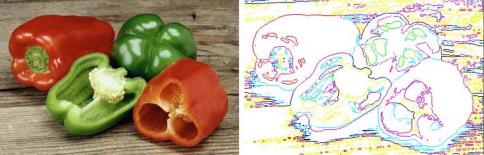
The stylizeTraceContour() method creates a contour-line effect by locating the transitions of the more significant bright areas and outlining them for each color channel.
Note: This function is “selection aware”—if a selection is made, the system applies the function based on the current selection. For more information about making selections, see selection() - Media Method.
Syntax
stylizeTraceContour(
[Level @ <value 0..255>]
[Upper @ <true, false>]
[Invert @ <true, false>]
);
Parameters
Level - indicates the level of each color gun. The default is 128.
Upper - if set to true, causes the upper edge to be delineated. The default is false (the lower edge is delineated).
Invert - if set to true, reverses the default foreground and background colors. The default is false.
Example
var image = new Media();
image.load(name @ "peppers.tga");
image.stylizeTraceContour(Level @ 96, Upper @ true, Invert @ true);
image.save(type @ "jpeg");
On-Line Documentation