equalize() - Media Method
The equalize() method equalizes the relevant components of the Media. Equalization takes the used range of a component and expands it to fill the available range. This can be applied to both indexed and non-indexed images.
Note: This function is “selection aware”—if a selection is made, the system applies the function based on the current selection. For more information about making selections, see selection() - Media Method.
Syntax
equalize(
[Brightness @ <-1.00 to 20.00>]
[Saturation @ <-1.00 to 20.00>]
);
Parameters
Brightness and Saturation - specify values that are given in terms of clip-value. Clip‑value is the percentage of pixels that can lie outside the measured range before expansion and whose value is therefore clipped in the process. The valid values are 0 to 20 and –1, although values between 0.5 and 1.0 generally produce the most favorable results.
Note: As a special case, specifying a clip-value of –1 applies histogram equalization to that channel. Histogram equalization is a much harsher method, but effectively maximizes the amount of visible information in an image.
Example
var image = new Media();
image.load(name @ "car.tga");
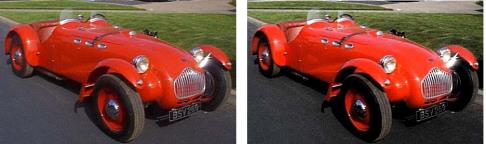
image.equalize(brightness @ 10, saturation @ 5);
image.save(type @ "jpeg");
On-Line Documentation