colorize() - Media Method
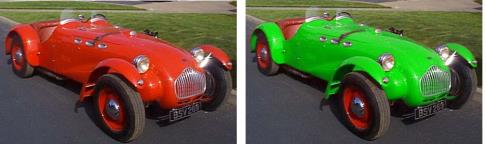
The colorize() method changes the hue of the pixels in the image to the specified color.
Note: This function is “selection aware”—if a selection is made, the system applies the function based on the current selection. For more information about making selections, see selection() - Media Method.
Syntax
colorize(
Color @ <color in hexadecimal or rgb>
[layers @ <"layer list">] // (PSD files only)
);
Parameters
Color - specifies the color using its hexadecimal or rgb value. The best results will appear by creating or loading a selection first.
Note: The extreme colors of solid black (0x000000) and solid white (0xffffff) do not appear correctly when used for colorize(). It is recommended that, instead, you use 0x101010, and 0xe0e0e0 or less (for black and white, respectively). Also, totally saturated colors (such as pure red) can create unexpected results.
layers - for PSD files, specifies the layers to be colorized. The layer numbers begin at 0 (background) and go up. For more information see load() - Media Method.
Example
var image = new Media();
image.load(name @ "car.tga");
image.selection(name @ "mskcar.tga");
image.colorize(color @ 0x009900);
image.save(type @ "jpeg");
On-Line Documentation