adjustRgb() - Media Method
The adjustRgb() method alters the contrast, brightness, and color balance of an image.
Note: This function is “selection aware”—if a selection is made, the system applies the function based on the current selection. For more information about making selections, see selection() - Media Method.
Syntax
adjustRgb(
[Contrast @ <value ±255>]
[Brightness @ <value ±255>]
[Red @ <value ±255>]
[Green @ <value ±255>]
[Blue @ <value ±255>]
[NoClip @ <true, false>]
[Invert @ <true, false>]
);
Parameters
The default value for any parameter not specified is zero/false.
Contrast - adjusts the overall contrast of the image.
Brightness - adjusts the overall brightness of the image.
Red, Green, and Blue - adjust the brightness of each of the three color channels individually.
Noclip - when specified, brightness adjustments will avoid maxing-out (either high or low) the image by reducing the contrast accordingly. A contrast offset can be used to override this process.
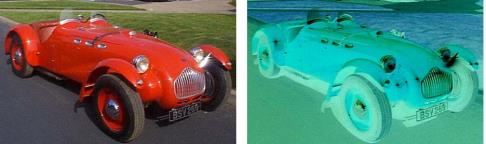
Invert - inverts the values of the three color channels. When mixed with any other settings in this command, all other calculations are performed first, then the inversion is applied as a last step.
Example
var image = new Media();
image.load(name @ "car.tga");
image.adjustRgb(red @ 120, blue @ 50, green @ 20, invert @ true);
image.save(type @ "jpeg");
On-Line Documentation